
Written by Arthur Simitian | PartsAdvisory
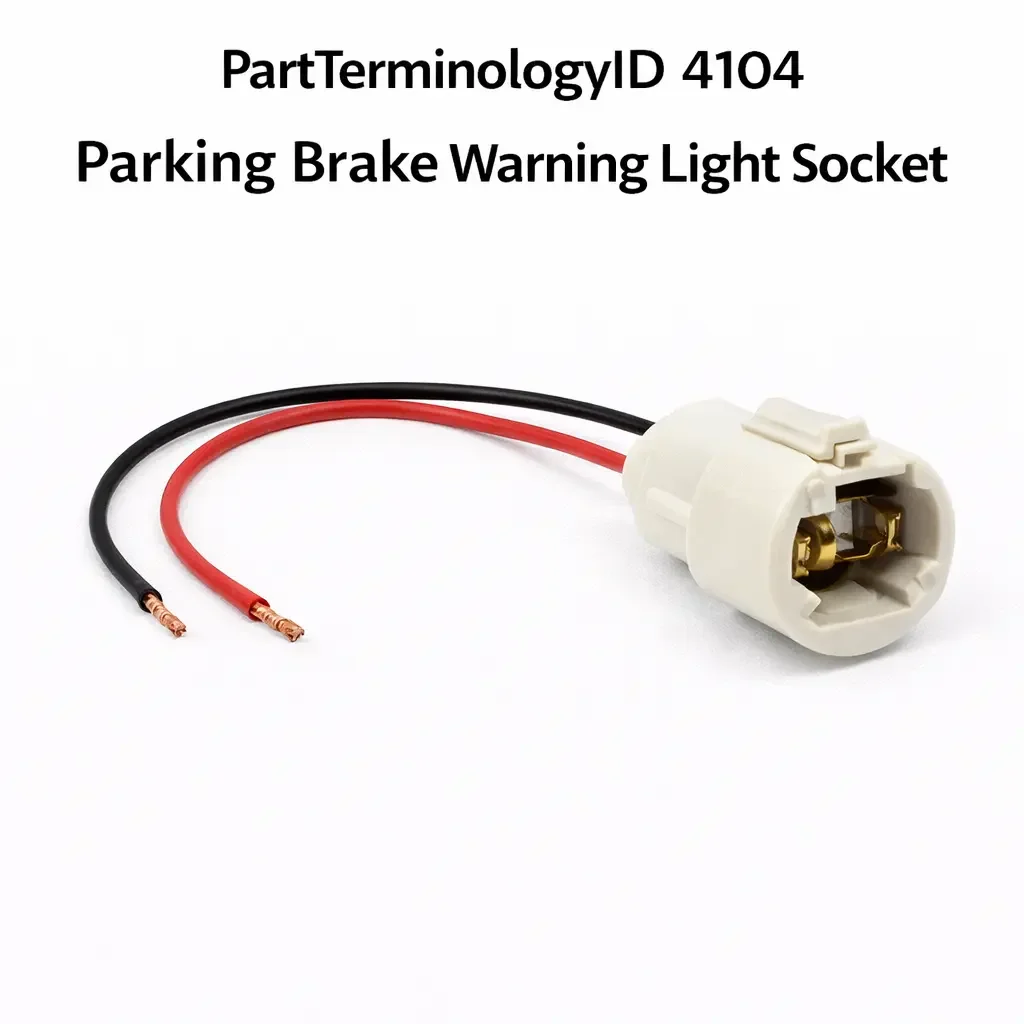
PartTerminologyID 4104, Parking Brake Warning Light Socket, is the bulb socket that holds the warning indicator bulb for the parking brake applied lamp in the instrument cluster or warning light panel, receiving switched power from the parking brake switch circuit when the parking brake is applied to alert the driver that the parking brake is engaged before or during vehicle movement. That definition covers the parking brake warning light socket function correctly and leaves unresolved whether the socket is a discrete replaceable bulb socket in a conventional instrument cluster with individual warning lamp positions, a printed circuit board bulb holder integrated into the instrument cluster PCB that requires cluster disassembly to access, a dedicated single-function warning lamp panel separate from the main instrument cluster on some truck and commercial vehicle platforms, whether the parking brake warning light circuit is switched by a simple mechanical switch at the parking brake handle or pedal that grounds the warning lamp circuit when the brake is applied, or is a BCM-monitored circuit where the BCM reads the parking brake switch input and activates a warning lamp output, whether the parking brake warning light shares its lamp circuit with the brake fluid level warning or the brake system fault warning on combined brake warning lamp applications, and whether a failed socket produces a continuously illuminated warning lamp, a dark warning lamp with the parking brake applied, or an intermittent warning that the buyer attributes to a parking brake or brake system fault rather than a socket fault.
For sellers, PartTerminologyID 4104 is the parking brake warning light socket where the combined brake warning lamp architecture is the most return-generating attribute, because many vehicles combine the parking brake applied warning, the low brake fluid warning, and the ABS or brake system fault warning into a single lamp position that illuminates for any of these conditions. A buyer whose combined brake warning lamp is illuminated continuously may have the parking brake fully released and assume the socket is stuck in the on position when the brake fluid level is low, an ABS fault is present, or a brake system fault code has triggered the combined indicator through the BCM. Socket replacement does not resolve any of these conditions and the buyer returns the socket when the warning lamp remains on after installation.
What the Parking Brake Warning Light Socket Does
Mechanical switch activation versus BCM-commanded indicator
On vehicles with mechanical parking brake switch activation the switch is a simple contact switch at the parking brake lever or pedal that closes a ground path when the brake is applied. The warning lamp socket supply terminal is connected to a switched voltage source through the instrument cluster, and the ground side of the lamp circuit is completed by the switch closure. When the parking brake is released the switch opens the ground path and the warning lamp extinguishes.
A failed parking brake switch that is stuck in the closed position keeps the ground path active continuously and the warning lamp illuminates regardless of parking brake position. A buyer who finds the parking brake warning lamp on with the brake released has a stuck parking brake switch in most cases rather than a socket fault. A buyer who finds the warning lamp dark with the brake applied has either a failed switch that is not closing when the brake is applied, a failed bulb, or a failed socket.
On BCM-managed applications the parking brake switch sends a signal input to the BCM which then activates the instrument cluster warning lamp through a BCM output. A BCM output driver fault or a cluster driver fault produces a dark warning lamp regardless of parking brake switch condition. The socket is correctly receiving no activation signal in this scenario.
Combined brake warning lamp and multi-condition illumination
The red brake warning lamp on most domestic and imported vehicles serves multiple warning functions simultaneously. The same lamp illuminates for any of the following conditions depending on the vehicle: parking brake applied, brake fluid level low, brake system hydraulic fault, ABS fault on some platforms, and electronic parking brake fault on vehicles with motorized parking brake systems. The BCM or instrument cluster logic determines which condition is triggering the lamp at any given time.
A buyer who sees the brake warning lamp on and assumes the socket is responsible for the continuous illumination has not considered that a non-parking-brake condition may be triggering the indicator. Fully releasing the parking brake and confirming whether the lamp extinguishes isolates the parking brake switch as the trigger. If the lamp remains on with the parking brake fully released, the trigger is a different brake system condition rather than the parking brake switch or socket.
Why This Part Generates Returns
Buyers return parking brake warning light sockets because the combined brake warning lamp is triggered by a low brake fluid level or ABS fault rather than a parking brake switch fault and socket replacement does not extinguish the lamp, the parking brake switch is stuck in the applied position keeping the lamp on continuously and the socket is correctly responding to the switch signal, the instrument cluster uses a PCB-integrated bulb holder with no discrete replaceable socket and the ordered part has no installation point, the warning lamp bulb has failed and the socket is undamaged so a bulb replacement is the correct repair, and the BCM output driver for the cluster warning lamp circuit has failed preventing lamp activation regardless of socket condition.
Status in New Databases
PartTerminologyID 4104 is cataloged in PIES/PCdb as Parking Brake Warning Light Socket. Under PIES 8.0 and PCdb 2.0 there is no change to the terminology or classification for this PartTerminologyID.
Top Return Scenarios
Scenario 1: "Combined brake warning lamp triggered by low fluid, parking brake released, lamp on continuously, socket replaced with no change"
The brake warning lamp is continuously illuminated. The parking brake is fully released. The brake fluid reservoir is below the minimum level. The BCM is triggering the combined brake warning lamp from the low fluid condition. The buyer replaces the parking brake warning light socket. The low fluid condition remains. The lamp remains on after socket installation.
Prevention language: "Combined warning lamp validation: The brake warning lamp on this application illuminates for multiple conditions including low brake fluid level, ABS fault, and parking brake applied in addition to socket faults. Fully release the parking brake and confirm whether the lamp extinguishes. If the lamp remains on with the parking brake released, check the brake fluid level and scan for ABS or brake system fault codes before diagnosing the socket. Socket replacement will not extinguish a lamp triggered by a non-parking-brake condition."
Scenario 2: "Parking brake switch stuck closed, lamp on continuously, switch replaced not socket"
The brake warning lamp is on continuously. The parking brake is fully released. The parking brake switch has a stuck contact that maintains the ground path regardless of lever position. The socket is correctly illuminated from the switch signal. The buyer replaces the socket. The stuck switch remains. The lamp remains on.
Prevention language: "Parking brake switch validation: A brake warning lamp that remains on with the parking brake fully released points to a stuck parking brake switch rather than a socket fault. Disconnect the parking brake switch connector and confirm whether the lamp extinguishes. If the lamp extinguishes when the switch is disconnected, the switch is stuck in the closed position and requires replacement rather than the socket."
Scenario 3: "PCB-integrated cluster bulb holder, no discrete socket, ordered part has no installation point"
The parking brake warning lamp is dark with the brake applied. The instrument cluster uses a PCB-integrated bulb holder soldered to the cluster circuit board with no discrete replaceable socket. The buyer orders a socket under PartTerminologyID 4104. No installation point exists. The buyer returns it as incorrect.
Prevention language: "Instrument cluster architecture: On many current applications the instrument cluster warning lamps use PCB-integrated bulb holders or LED indicators with no discrete replaceable socket. If your instrument cluster does not have a removable socket at the parking brake warning lamp position, this PartTerminologyID does not apply. A dark warning lamp on a PCB-integrated cluster requires cluster repair or replacement."
Scenario 4: "Failed warning lamp bulb, socket intact, bulb replacement resolves dark warning"
The parking brake warning lamp does not illuminate when the brake is applied. The socket is undamaged and the parking brake switch is confirmed closing the ground path when the brake is applied. The warning lamp bulb has a failed filament. The buyer replaces the socket. The lamp illuminates. The buyer returns the original socket as defective when the bulb was the failed component.
Prevention language: "Bulb pre-check: Before replacing the socket confirm the warning lamp bulb filament is intact. Apply supply voltage to the socket terminals directly and confirm the bulb illuminates. A failed bulb filament is a common cause of a dark warning lamp with a confirmed functional switch and socket. Replace the bulb before ordering a socket replacement."
Listing Requirements
PartTerminologyID: 4104
Cluster architecture: discrete replaceable socket or PCB-integrated holder (mandatory)
Lamp circuit: dedicated parking brake or combined brake warning lamp (mandatory)
Switch activation: mechanical ground switch or BCM-commanded output (mandatory)
Bulb base type and wattage specification (mandatory)
Combined warning lamp validation note (mandatory)
Parking brake switch validation note (mandatory)
Bulb pre-check note (mandatory)
PCB-integrated cluster note where applicable (mandatory)
OEM part number cross-reference (mandatory)
Catalog Checklist for ACES/PIES Teams
PartTerminologyID = 4104
Require cluster architecture: discrete socket or PCB-integrated (mandatory)
Require lamp circuit type: dedicated or combined (mandatory)
Require switch activation architecture (mandatory)
Prevent combined lamp misdiagnosis: lamp on with parking brake released is a non-parking-brake condition; fluid level and fault code check must precede socket diagnosis
Prevent stuck switch socket return: lamp on continuously with brake released is a switch fault; switch disconnect test must precede socket replacement
Prevent PCB-integrated return: no discrete socket on PCB-integrated cluster applications; architecture must be confirmed before ordering
FAQ (Buyer Language)
My brake warning light is on but the parking brake is released. Is it the socket?
A brake warning lamp that remains on with the parking brake fully released is almost never a socket fault. Check the brake fluid level first. A low fluid level triggers the combined brake warning lamp on most vehicles. If the fluid level is correct, scan for ABS or brake system fault codes. If no fault codes are present, disconnect the parking brake switch connector and confirm whether the lamp extinguishes. If it does, the switch is stuck closed and requires replacement rather than the socket.
How do I access the parking brake warning light socket in my instrument cluster?
Access varies by cluster design. On conventional instrument clusters with individual lamp positions the cluster is removed from the dash and the socket is accessed from the rear of the cluster housing. On PCB-integrated designs the cluster must be disassembled to access the bulb holder position on the circuit board. Confirm your cluster design before ordering to ensure a discrete replaceable socket exists.
My parking brake warning light does not come on when I apply the brake. Is it the socket?
A dark warning lamp with the brake confirmed applied has three possible fault sources: a failed parking brake switch that is not closing when the brake is applied, a failed bulb, or a failed socket contact. Test the switch first by probing for a ground signal at the switch output with the brake applied. If the switch is closing correctly and supply voltage is present at the socket terminal, test the bulb directly before replacing the socket.
Can I replace just the bulb in the parking brake warning socket?
Yes on conventional cluster applications where the bulb is separately replaceable from the socket. Remove the socket from the cluster housing and pull the bulb from the socket. Confirm the bulb base type and wattage specification before ordering a replacement bulb. A bulb replacement resolves a dark warning lamp at lower cost than socket replacement when the socket housing is undamaged.
What Sellers Get Wrong About PartTerminologyID 4104
The most common error is omitting the combined warning lamp validation note. The brake warning lamp on most vehicles serves multiple conditions and a continuously illuminated lamp with the parking brake released points to a non-parking-brake condition in the majority of cases. Without the validation note buyers replace the socket on a low fluid or ABS fault condition and return it when the lamp remains on. The combined lamp validation note converts this return into a fluid level check or fault code scan before any part is ordered.
The second error is omitting the stuck switch validation note. A parking brake switch stuck in the closed position produces continuous lamp illumination that is identical to a socket stuck in the on position from the buyer's perspective. Without the switch disconnect test guidance buyers replace the socket when the switch is the fault source.
The third error is omitting the PCB-integrated cluster note. A growing share of current instrument clusters use PCB-integrated warning lamp indicators with no discrete replaceable socket. Without the architecture note buyers order a discrete socket that has no installation point on their cluster.
Cross-Sell Logic
Parking Brake Warning Lamp Bulb: for buyers where the socket is confirmed functional, the switch is closing correctly, and supply voltage is present at the socket terminal, but the warning lamp does not illuminate, indicating a failed bulb filament.
Parking Brake Switch: for buyers where the warning lamp is on continuously with the brake released and switch connector disconnection extinguishes the lamp, confirming a stuck switch rather than a socket fault, and for buyers where the warning lamp is dark with the brake applied and the switch is confirmed not closing.
Instrument Cluster: for buyers on PCB-integrated cluster applications where no discrete socket exists and a failed warning lamp indicator requires cluster repair or replacement.
BCM: for buyers where the parking brake switch is confirmed signaling correctly but the BCM output for the cluster warning lamp is absent, indicating a BCM output driver fault rather than a socket fault.
Final Take for PartTerminologyID 4104
Parking Brake Warning Light Socket (PartTerminologyID 4104) is the brake status indicator component where combined warning lamp validation, parking brake switch disconnect test, PCB-integrated cluster identification, and bulb pre-check are the four attributes that prevent the four most common return scenarios. Every listing without combined lamp validation generates returns from buyers whose lamp was triggered by a non-parking-brake condition. Every listing without the switch disconnect test generates returns from buyers whose stuck switch was the fault source. Every listing without PCB-integrated cluster identification generates returns from buyers with no discrete socket installation point. Every listing without bulb pre-check generates returns from buyers who replaced a functional socket when a bulb was the correct repair.
Together these four attributes make every listing under this PartTerminologyID complete.