
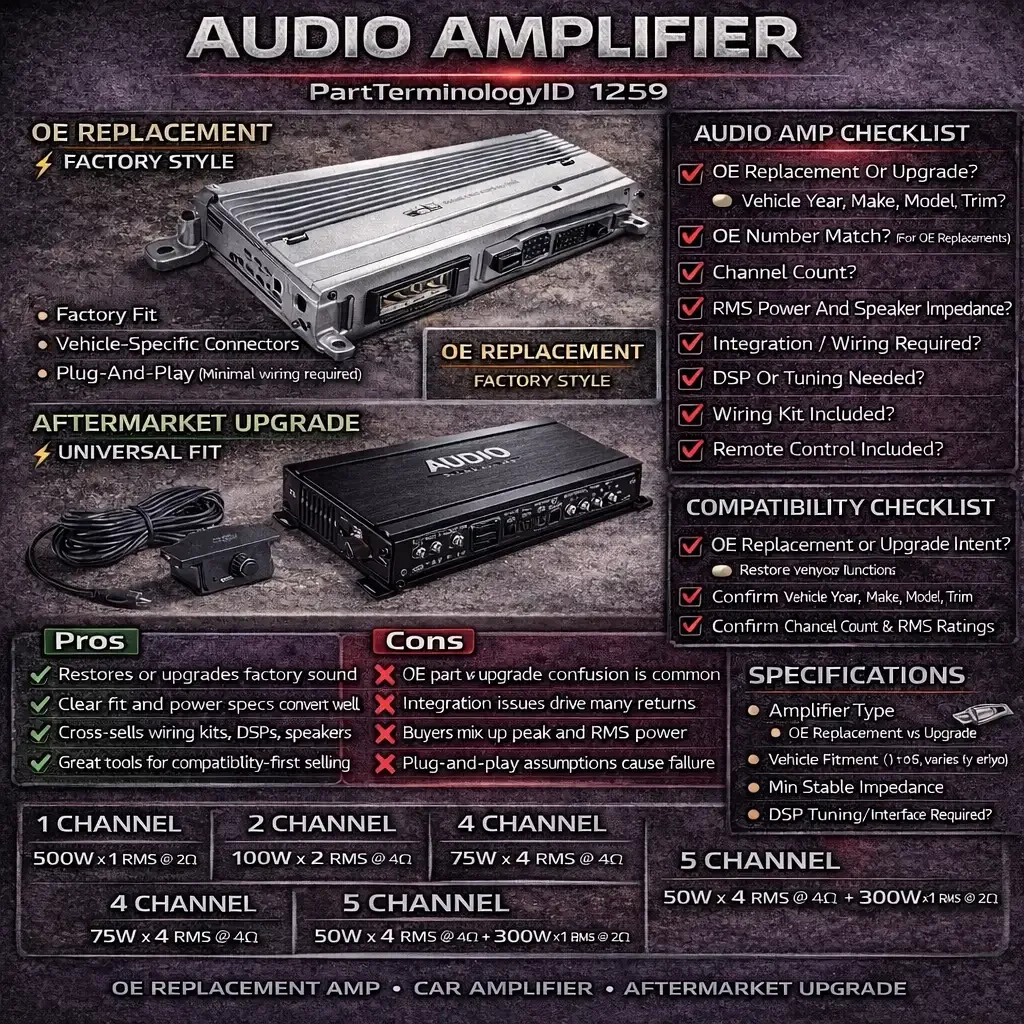
Audio Amplifier is one of those categories where buyers think they are buying “an amp,” but what they really need is “an amp that works with this vehicle, this head unit, and this speaker setup.”
That difference is everything.
PartTerminologyID 1259 Audio Amplifier covers two very different buying intents:
OE replacement
A customer’s factory amp failed. They want the same function back with minimal installation risk.Aftermarket upgrade
A customer wants better output and sound quality, but they may not realize their vehicle’s audio architecture is not compatible with random amps without adapters, tuning, or signal integration hardware.
When listings do not separate these intents clearly, the same complaints show up repeatedly:
“No sound after install”
“Does not fit the connectors”
“Wrong mounting bracket”
“Popping noise”
“Only some speakers work”
“Keeps going into protection mode”
“Volume is low”
“Steering wheel controls stopped working”
“Active noise cancellation issues”
“Factory subwoofer stopped working”
This is not only a return problem. It is a reputation problem. Audio customers move fast and leave harsh reviews when the listing misleads them.
This PartsAdvisory post is written for catalog teams and sellers who want higher conversion with lower return rates by making Audio Amplifier listings accurate, buyer-proof, and integration-aware.
What an Audio Amplifier Usually Means
In aftermarket catalog use, Audio Amplifier generally refers to an electronic module that increases audio signal power to drive speakers and subwoofers.
Audio amplifiers in vehicles can be:
factory-installed (OE) amplifiers integrated into the vehicle audio system
aftermarket amplifiers added to improve output and tuning capability
powered subwoofer amps or monoblock sub amps
multi-channel full-range amps
What is not automatically included:
wiring kits
mounting brackets
vehicle-specific harness adapters
signal integration modules (LOC, DSP, interface modules)
tuning setup or calibration
That separation matters. Many returns happen because the buyer assumes plug-and-play.
Why Audio Amplifier Creates Catalog Confusion
OE replacement and aftermarket upgrade are not the same listing
An OE amp is usually:
vehicle-specific
connector-specific
mounting-location specific
integrated with factory head unit signals and vehicle communication
An aftermarket amp is usually:
universal hardware footprint
universal power wiring requirements
requires integration with the factory system or aftermarket head unit
If a catalog does not clearly label whether the product is OE replacement or aftermarket upgrade, buyers will buy the wrong item.
“Fits” is not just a physical fit
Audio fitment is both:
mechanical fit (mounting position and bracket)
electrical and signal fit (connectors, voltage, turn-on, input type, communication)
A listing that only claims mechanical fit will still fail in installation.
Modern vehicles have complex audio architectures
Some vehicles use:
amplified factory systems with multiple amp modules
digital audio networks (varies by OEM and trim)
active noise cancellation microphones and processing
integrated DSP profiles
factory subwoofer and separate channels
OEM signal equalization that must be corrected for aftermarket upgrades
If a listing ignores this, the buyer will discover it mid-install and return everything.
Status in New Databases
Status in New Databases
PartTerminologyID: 1259
Terminology Name: Audio Amplifier
Current: PIES 7.2 + PCdb
Future: PIES 8.0 + PCdb 2.0
Status: No change
The term remains stable. The real opportunity is cleaner classification between OE replacement and aftermarket upgrades, plus structured attributes for channel count, connectors, and integration requirements.
The Variants You Must Separate in Catalog
1) OE Replacement Amplifiers
These are the most sensitive listings because buyers expect plug-and-play.
Common identifiers:
OE style module form factor
vehicle-specific connectors
factory mounting location
sometimes trim-specific audio packages
Common return triggers:
wrong trim or audio package
wrong connector revision
wrong mounting bracket orientation
wrong amplifier type (separate sub amp vs main amp)
Catalog fields that matter:
exact vehicle fitment with trim and audio package notes
OE number mapping
connector type and pin count when available
mounting location notes
“programming required” notes if applicable (only if manufacturer states it)
2) Aftermarket Multi-Channel Amplifiers
Common for full-range speaker upgrades.
Common return triggers:
buyer did not understand they need a wiring kit
buyer’s factory head unit output requires a line output converter or DSP
gain structure mismatch and noise
impedance mismatch with speaker setup
Catalog fields that matter:
channel count
RMS power ratings per channel
input type (high-level, RCA, etc.) if supplied
minimum stable impedance
wiring kit required yes
installation notes: integration required with factory system
3) Monoblock Subwoofer Amplifiers
Used primarily for subwoofer performance.
Common return triggers:
wrong impedance stability
incorrect power expectations
inadequate electrical system support
buyer expects it to run door speakers too
Catalog fields that matter:
mono channel classification
RMS power at specific ohm loads
minimum impedance stable
remote bass control included yes or no
4) DSP Amplifiers and Integration-Focused Products
Some products include DSP tuning functionality or require tuning.
Common return triggers:
buyer expected plug-and-play sound improvement
buyer did not understand tuning requirements
factory signal processing causes poor results without correction
Catalog fields that matter:
DSP included yes or no
tuning required note
application type (integration vs pure amplification)
Pros and Cons
Audio amplifier can be OE replacement or aftermarket upgrade. Pros and Cons helps set expectations and reduce returns.
Pros
Strong demand for OE replacement when factory amps fail
High AOV category for upgrades, especially multi-channel and sub amps
Clear spec-based listings convert well
Attachment opportunities with wiring kits, DSP, and speakers
Great category for “compatibility-first” selling when data is accurate
Cons
Wrong purchases often stem from integration issues, not the product itself
“Fits” claims are risky without trim and audio package clarity
Noise and protection mode complaints are common when specs are not matched
Aftermarket installs often require additional parts and tuning
Buyers frequently confuse peak power with RMS power
Fitment and Compatibility Factors That Drive Returns
1) Channel count and output use case
Buyers need to know whether the amp is intended for:
door speakers and tweeters (multi-channel)
subwoofer only (monoblock)
full system with DSP
Catalog best practice:
Surface channel count and intended use clearly.
2) Power ratings buyers actually understand
Many buyers are misled by peak power marketing.
Catalog best practice:
If available, publish:
RMS power per channel at specific impedance
Avoid using only peak power in the listing headline.
3) Impedance stability and speaker matching
This is a real failure mode:
amp goes into protection mode
distorted audio
overheating
Catalog best practice:
Publish:
minimum stable impedance
recommended impedance range if provided
4) Inputs and integration requirements
Factory systems may require:
high-level inputs
line output converters
DSP integration
interface modules depending on vehicle
Catalog best practice:
Do not promise plug-and-play for aftermarket amps unless the kit is truly vehicle-specific with harness adapters. Use clear language:
“Integration parts may be required depending on factory audio system.”
5) Mounting location and connectors for OE replacements
OE replacement amps are often installed in:
trunk side panel
under seat
behind dash
rear cargo area
Catalog best practice:
Include mounting location notes and connector notes when available, and keep fitment mapping tight.
Buyer Checklist
Use this checklist early in the description and in marketplace bullets.
Buyer Checklist
Decide your intent:
OE replacement (restore factory function)
aftermarket upgrade (improve output and tuning)
Confirm vehicle year, make, model, trim
Confirm whether your vehicle has a premium audio package
For OE replacement:
confirm OE number match if available
confirm connector style and mounting location
For aftermarket upgrade:
confirm channel count
confirm RMS power expectations
confirm minimum stable impedance
confirm input type and whether factory integration parts may be needed
Confirm what is included:
wiring kit included yes or no
mounting hardware included yes or no
remote control included yes or no
Confirm whether tuning or DSP setup is required for your goal
If the buyer cannot complete this checklist from the listing, returns are likely.
Catalog Checklist for Structured Data
PartTerminologyID 1259 is a category where structured attributes prevent the majority of problems.
Catalog Checklist
Use PartTerminologyID 1259 and exact term Audio Amplifier
Add a required Amplifier Type attribute:
OE Replacement Amplifier
Multi-Channel Amplifier
Monoblock Subwoofer Amplifier
DSP Amplifier / Integration Amplifier
Populate channel count
Populate RMS power fields at specified ohm loads when available
Populate minimum stable impedance
Populate input type when supplied (high-level, RCA, etc.)
Populate DSP included yes or no
Populate wiring kit included yes or no
Populate remote included yes or no
For OE replacement:
populate OE number cross references
populate mounting location note
add trim or audio package notes
Add plain-language Contents Included
Add plain-language Integration Notes
Use images that show:
connector face for OE modules when possible
terminal layout for aftermarket amps
dimension callouts if provided by manufacturer
A strong QA rule: if the listing does not clearly state OE replacement vs aftermarket upgrade, do not publish.
Common Buyer Scenarios and Return Causes
Scenario 1: Buyer purchased an aftermarket amp expecting plug-and-play
They install it and get no sound or poor sound.
Prevention:
State clearly that integration parts may be required with factory systems and list what is included.
Scenario 2: Buyer ordered the wrong OE amp for the trim package
The vehicle has a premium audio system with a different module.
Prevention:
Use trim and audio package notes, and map OE numbers where available.
Scenario 3: Amp goes into protection mode
Speaker load does not match amp impedance stability.
Prevention:
Publish minimum stable impedance and recommended speaker matching guidance based on manufacturer specs.
Scenario 4: Only some speakers work
Channel routing and factory wiring integration is incorrect.
Prevention:
Clarify intended use, channel count, and whether a DSP or integration module is required.
Scenario 5: Buyer expected big power gains
They bought based on peak power marketing.
Prevention:
Lead with RMS power in specs and explain that RMS is the meaningful comparison number.
Scenario 6: Noise, whine, or popping
Integration and grounding issues are common.
Prevention:
Do not overpromise. Use a practical note that installation quality and integration method affects noise performance.
Scenario 7: Physical fit mismatch for OE module
Mounting location and bracket orientation differ.
Prevention:
Use vehicle-specific fitment mapping and provide mounting location notes. Do not overextend year ranges.
FAQ
Is Audio Amplifier the same as a head unit?
No. The head unit is the source and control. The amplifier increases power to drive speakers.
Can I install any amplifier in any car?
Not reliably. Aftermarket amps can be installed in many vehicles, but factory system integration varies and may require adapters, DSP, or interface modules.
What is the biggest catalog mistake for Audio Amplifier?
Not separating OE replacement amplifiers from aftermarket upgrade amplifiers, and not publishing channel count and impedance details.
Why does trim level matter for OE amp replacement?
Premium audio packages often use different amplifiers, different channel routing, and different connectors.
Do I need a wiring kit?
For aftermarket amps, usually yes. For OE replacements, usually no, but it depends on what you are replacing.
What does RMS power mean?
RMS is a more realistic measure of continuous power output compared to peak power claims.
What impedance should I match?
Follow the amplifier’s minimum stable impedance rating. Mismatched loads can cause overheating or protection mode.
Does a DSP amplifier require tuning?
Often yes. Some are pre-configured in vehicle-specific kits, but many require tuning to achieve the desired result.
Why do buyers get “no sound” after installing an amp?
Common causes include wrong input integration, missing turn-on signal, incorrect wiring, or using the wrong amp type for the factory system.
Final Takeaway
PartTerminologyID 1259 Audio Amplifier is a category where the best listings are not the loudest. They are the clearest.
If you want lower returns:
separate OE replacement vs aftermarket upgrade intent
publish channel count, RMS power, and impedance stability
be honest about integration requirements
tighten fitment mapping and trim notes for OE modules
Do that, and Audio Amplifier becomes a high-confidence category instead of a support ticket generator.