
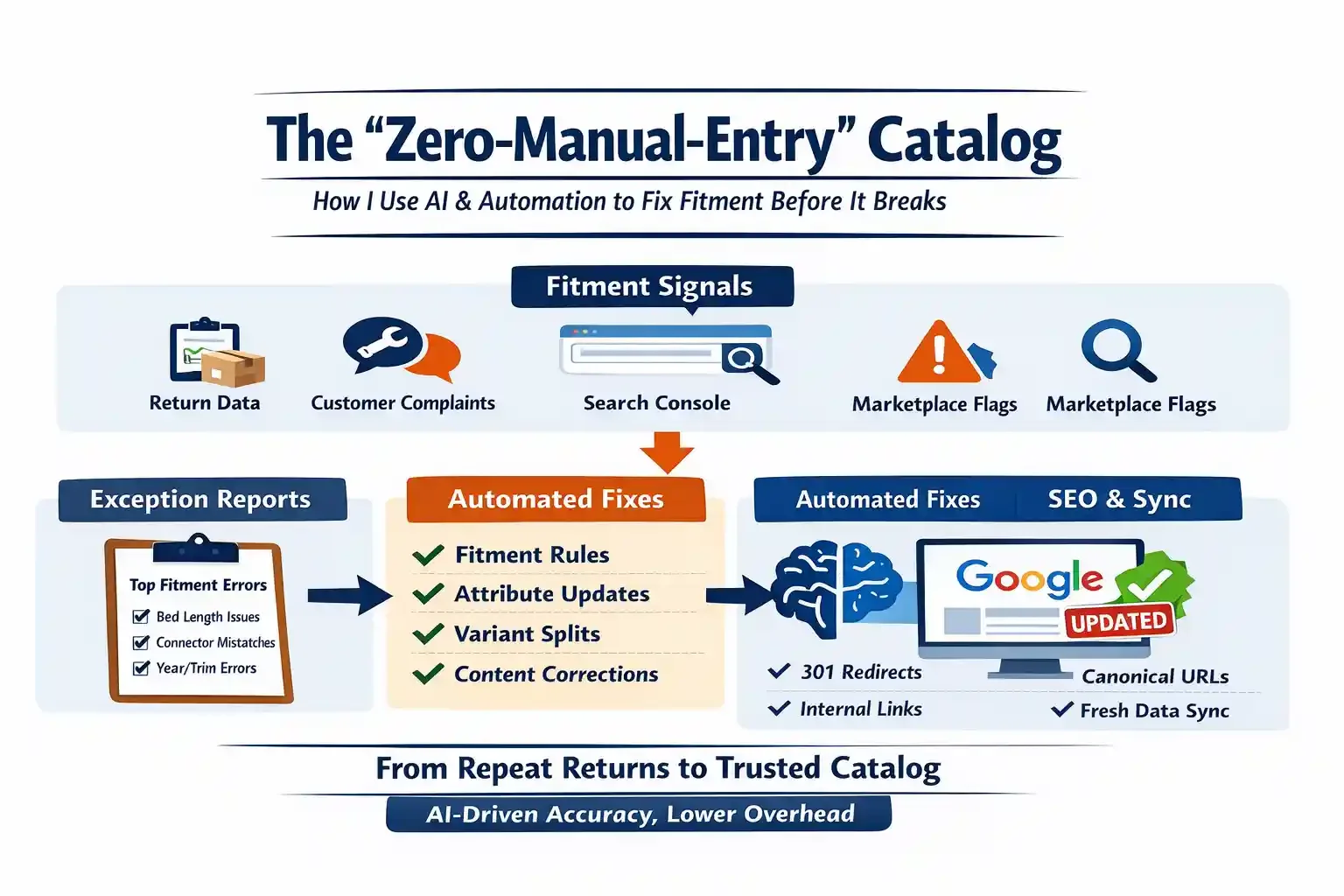
How I Use AI + Automation to Catch Fitment Problems Before They Turn Into Returns
Most people hear “automation” and picture robots in a warehouse.
In the aftermarket auto parts world, that’s not the bottleneck.
The real bottleneck is manual entry and manual cleanup - the constant grind of reading returns, scanning customer complaints, chasing broken fitments, updating listings, and then doing it all again next week.
If you sell car parts on eBay Motors, Amazon, Walmart, or your own site (Shopify or Squarespace), you already know the pain:
“Doesn’t fit” returns that nuke margin
Customer service tickets that repeat the same few patterns
Marketplace defects / suppressed listings
A catalog that looks “fine”… until volume exposes the cracks
The fastest way out isn’t a full catalog rebuild.
It’s building a loop that finds the same repeat errors automatically - and pushes them into a clean review queue before they become expensive.
That’s what I mean by a Zero-Manual-Entry Catalog:
Not “no humans involved.”
It means humans stop doing the dumb part - copying, pasting, reformatting, and guessing.
Humans only touch review + decisions.
The uncomfortable truth: catalog audits don’t fail because they’re hard
They fail because they’re never-ending.
A traditional “audit” sounds like a project:
“Let’s audit fitment.”
“Let’s normalize attributes.”
“Let’s clean up SEO.”
But in reality, the catalog is a living thing. It changes every day:
new SKUs
new suppliers
new VCDB updates (or your internal fitment logic)
new marketplace rules
new customer behavior
So a one-time audit becomes death by a thousand cuts. Teams burn out. The work stops. The same issues return.
The solution is not more effort. It’s a system.
The Tech Stack of the Modern Parts Seller (what actually matters)
You don’t need 14 tools. You need a simple stack that creates a feedback loop:
1) Signal Sources (where problems show up first)
Returns reasons (Shopify, eBay, Amazon, internal OMS)
Customer messages (“didn’t fit”, “wrong connector”, “too short”)
Product reviews (especially 1-2 stars)
Search Console queries (Google is literally telling you what users expected)
Marketplace “fitment dispute” or “not as described” flags
2) A “Normalization Layer” (turn messy text into structured data)
This is where LLMs actually shine:
Not to “guess fitment”
But to classify messy human complaints into consistent buckets
3) A Rules + Review Queue (where money gets saved)
A spreadsheet, Airtable, Notion, or a lightweight database table
A workflow that assigns issues to the right owner
A “fix type” + “confidence” score
A “what to change” recommendation
4) Publishing + Propagation (where most teams mess up)
Fixing data isn’t enough. You need to make sure the corrected truth propagates to:
your product page content
your fitment table
your marketplace listings
and Google’s understanding of those pages
That includes SEO hygiene (canonical URLs, redirects, internal links, and freshness signals).
The workflow: how I run it (simple, repeatable, scalable)
Step 1 - Capture return/complaint data automatically
Start with the raw stuff, even if it’s ugly:
Return reason text
Customer message snippets
Order info (SKU, brand, vehicle entered, marketplace/channel)
Date + volume
Goal: one place where every “fitment pain signal” lands.
This can be:
Google Sheet (fine at first)
Airtable (better workflow)
A database (later, if you want scale)
Important: don’t overbuild. Your advantage is speed.
Step 2 - Use AI to normalize complaints into “exception codes”
This is the part that saves the most time.
Humans write complaints like this:
“didnt fit my truck”
“holes don’t line up”
“connector different”
“too short”
“wrong side”
“doesn’t match picture”
That’s not usable for fixing a catalog.
So I convert unstructured text into structured labels, like:
Fitment Error: Year/Model/Trim mismatch
Attribute Error: Bed length / wheelbase
Attribute Error: Engine mismatch
Position Error: Left vs Right
Variant Error: Connector / plug type
Interchange Error: wrong part number mapping
Content Error: photo/description mismatch
Now you have data you can actually trend:
which SKUs produce the most exceptions
which vehicle attributes are missing
which brands/suppliers are repeat offenders
which marketplaces create the most false positives
This is the 80/20 moment.
A small number of repeat patterns usually cause most “doesn’t fit” returns.
Step 3 - Create a ranked exception report (what to fix first)
Don’t fix everything. Fix what’s expensive.
Rank exceptions by:
return rate impact
revenue
ad spend wasted
marketplace penalty risk
customer service time
Your output becomes a weekly “Exception Report” that reads like:
SKU 12345 - 28 returns - “Position Error: Left/Right”
SKU 77881 - 14 returns - “Attribute Error: Bed length”
SKU 99110 - 9 returns - “Variant Error: Connector mismatch”
That report is how you stop playing whack-a-mole.
Step 4 - Apply fixes with rules (not one-off heroics)
Most catalog fixes should be one of these:
A) Fitment rule fix
wrong fitment mapping
missing trims
wrong engine notes
incorrect submodel logic
B) Attribute enrichment
add bed length / wheelbase / door count
connector type
sensor locations
bracket included vs not included
“w/ tow package” or “w/o”
C) Variant separation
one SKU actually needs two options
or a listing needs an explicit selector (plug type, sensor count, etc.)
D) Content correction
photos show the wrong version
bullet points conflict with specs
title implies coverage that isn’t real
The key is to write fixes as repeatable rules:
“Any part with two connector types must be split into two variants.”
“Any application requiring bed length must not be shown without bed length data.”
“Any listing using ‘fits all’ language gets blocked.”
This is where catalog management becomes a system, not an art project.
What this changes in real life
When you run this loop consistently, you get compounding wins:
fewer “doesn’t fit” returns
lower customer service workload
higher conversion (confidence improves)
fewer marketplace defects
a catalog you can scale without hiring an army
And the best part: your time shifts from cleanup to growth.
That’s when you can actually do the work that moves the business:
expand SKU coverage
improve marketplace readiness
build private label correctly
invest in better content
If you’re trying to build this and don’t know where to start
Start small:
Pick one channel (eBay Motors or your site)
Pull 30 days of returns + messages
Normalize into exception codes
Rank by impact
Fix the top 10 issues
Repeat weekly
That alone will beat the “we’ll audit later” teams by miles.
If you want help building the workflow (exception taxonomy, automation design, catalog rules, marketplace propagation, and SEO structure), that’s exactly what I do at Parts Advisory - practical catalog + fitment + marketplace consulting focused on returns reduction and scalable growth.
Want a repeatable “Exception Report” for your catalog? Send me 30 days of anonymized returns + customer messages and I’ll show you the top failure patterns and the fastest fixes.