
Trusting your supplier’s data feed is the fastest way to wreck your catalog.
That sounds like an overstatement. It isn’t.
If you run eCommerce, a marketplace, or any kind of product discovery experience, your catalog is the product. Not the site design. Not the ad spend. Not the brand narrative. The catalog.
So when someone on the team says, “Don’t worry, we have a feed,” what they actually mean is: here’s a file that will quietly generate thousands of problems you’ll spend the next two quarters chasing.
Why Supplier Feeds Break Down
Most supplier and manufacturer data exists to serve internal operations first. It gets exported as “a feed” because a retail partner asked for one.
That data was almost never built for retail naming conventions, standardized attributes, marketplace compliance, clean year/make/model fitment, consistent imagery and pricing structures, variant logic, position logic, or your category tree and filter architecture.
Even well-intentioned suppliers ship the same problems over and over:
Fitment gaps or overreach: incomplete coverage or overly broad fitment that drives returns.
Inconsistent naming: part titles built for warehouse staff, not shoppers.
Missing or wrong position data: Left/Right/Front/Rear fields that are blank or incorrect.
Engine and submodel confusion: looks fine on import, shows up when returns start climbing.
Malformed attributes: wrong formats, missing units, conflicting values across records.
Buried qualifiers: critical notes and exclusions hidden in free-text fields nobody reads.
Duplicate or recycled SKUs: the same SKU pointing at different items, or different SKUs pointing at the same one.
Image problems: missing, mismatched, low-resolution, or watermarked.
Pricing errors: fields that ignore MAP rules, core charges, or fee structures.
Ghost inventory: discontinued items that never got flagged as such.
If you’re thinking, “Our supplier is top tier, this doesn’t apply,” that’s exactly when it hits you. Strong suppliers still ship messy data because formatting it for retail isn’t their core job.
The Dirty Data Tax
Here’s the part most teams underestimate: dirty data is not a minor inconvenience. It is a tax. You pay it every single day, in cash and in time.
Returns and wasted shipping
Customer support load
Marketplace penalties and suppressed listings
Conversion loss from broken filters and dead-end searches
Brand erosion from “this doesn’t fit my vehicle” reviews
Internal burnout, because every team is stuck firefighting instead of building
A “free” supplier feed quietly becomes one of the most expensive decisions you make.
The Migration Story Nobody Warns You About
I’ve been on the receiving end of third-party feeds, raw manufacturer dumps, and “we switched platforms, here’s the export” migrations. The pattern is always the same:
The feed goes live fast because the business is pushing for speed.
Search results and filters start behaving strangely.
Fitment mismatches appear.
Returns climb. Reviews suffer. Marketplace health metrics slip.
The team burns months patching symptoms instead of fixing the root cause.
Most catalog fires start as quiet feed decisions that nobody questioned at the time.
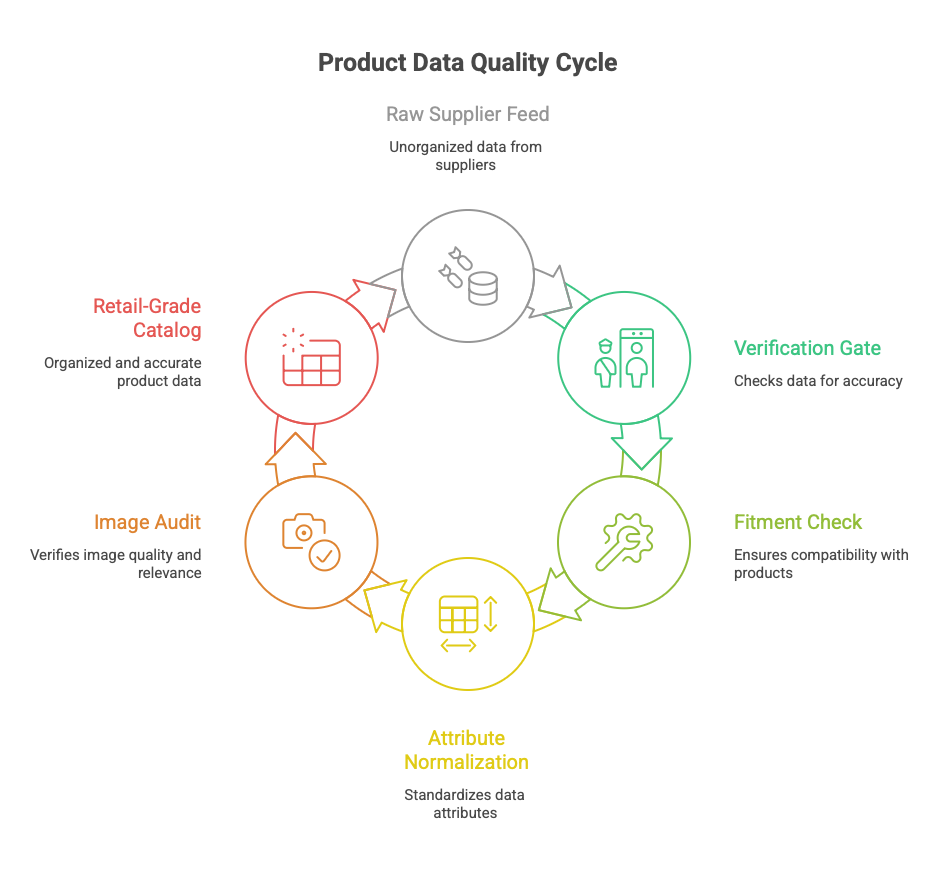
The Fix: Verification First
No feed goes live without a hands-on spot-check. Not “reviewed later.” Not “we’ll clean it up after launch.” Not “the supplier said it was good.”
Before anything touches production, someone inspects it as if mistakes will cost real money, because they will.
What a Real Spot-Check Looks Like
This is not scrolling through a spreadsheet for thirty seconds.
Pull a meaningful sample.
Fifty to two hundred SKUs depending on feed size. Mix best sellers with long-tail items. Include positions, variants, and high-return categories.Validate the fundamentals.
SKU uniqueness and stability. Part names that make sense to a customer. Correct brand, category, and product type assignments. Images attached and accurate.Validate fitment like you mean it.
Check known problem vehicles and trims. Confirm year-range logic. Confirm engine and submodel qualifiers. Verify that notes fields aren’t hiding critical exclusions.Validate attributes and filters.
Do attributes map cleanly into your filter structure? Are units consistent? Are values normalized? Or are you seeding the site with junk entries like “N/A” and “Unknown”?Validate pricing and policy fields.
MAP compliance, core charges, hazardous material flags, oversize flags. Marketplace-specific fields where applicable. Shipping dimensions and weight.
If the sample fails, the feed fails. Full stop.
The Cleansing Process That Pays for Itself
Feeds don’t need to be flawless. They need to be controlled.
Staging environment first. Never ingest directly into production. Ever.
Schema validation. Force the feed to prove it meets your required columns and formats before anything else happens.
Normalization rules. Standardize positions, naming conventions, units, and attribute values on intake.
Fitment gate. Run automated logic checks, then do human verification on known high-risk vehicles.
Diff reporting. When a supplier updates their feed, you see exactly what changed before it touches the live catalog.
Exception handling. Build a queue for items that fail checks. Nothing that fails a gate leaks onto the site.
The Bottom Line
Supplier feeds are not a catalog strategy. They are raw material. Your job is to turn that raw material into a retail-grade catalog that actually performs.
So, do you upload feeds as-is, or do you have a cleansing process?
If you want a second opinion, drop your current feed workflow here and I’ll help you shape it into a Verification First gate your team can run every week.