
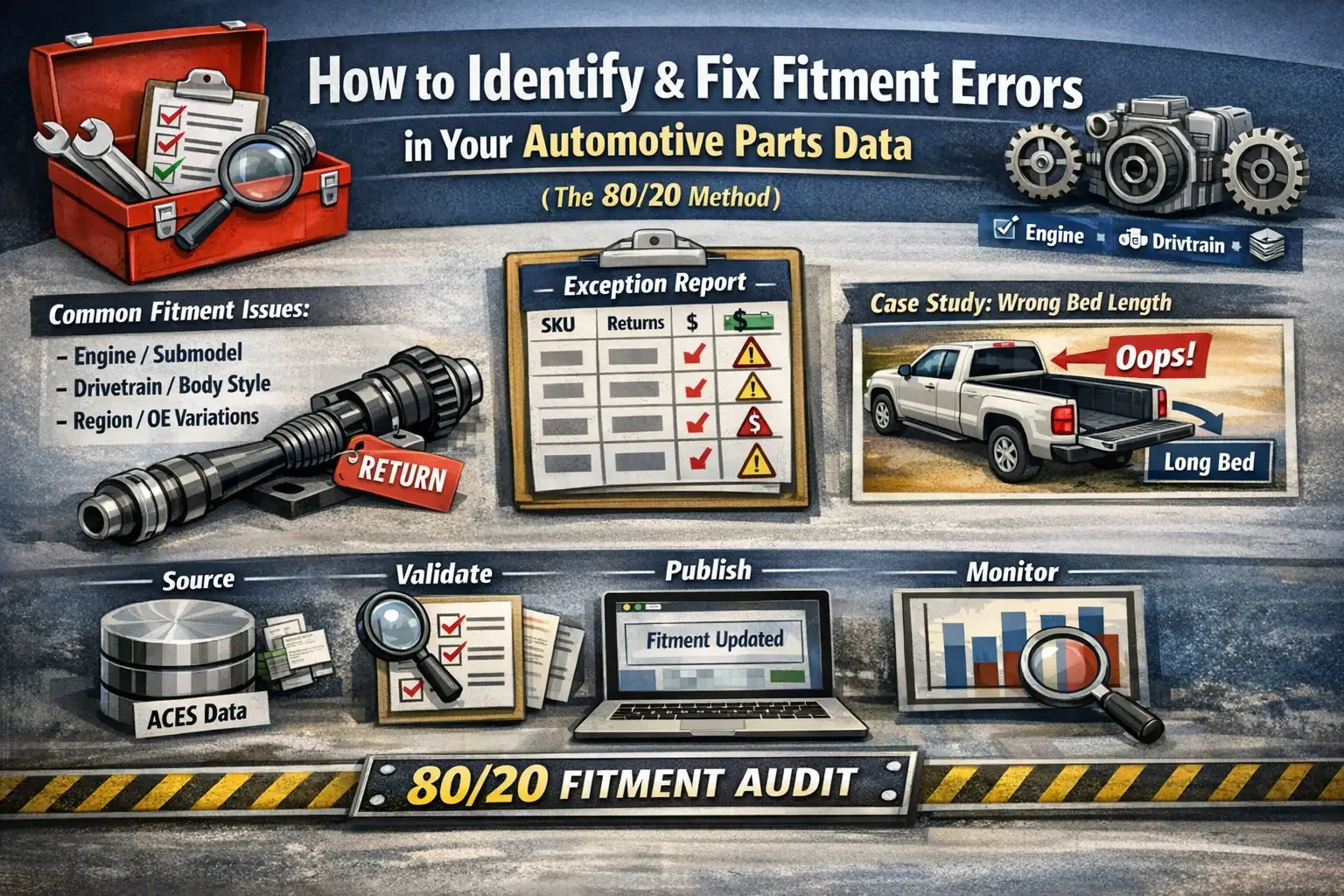
Fix Fitment Errors in Your Automotive Parts Data (The 80/20 Method)
Most aftermarket sellers don’t have a “catalog problem.”
They have an 80/20 fitment problem:
a small set of SKUs causes most of the “doesn’t fit” returns, customer complaints, and marketplace defects.
And the reason teams get stuck is simple: they try to fix fitment from the top down.
They stare at 50,000 SKUs like every one of them deserves equal attention… when the truth is usually the opposite.
50 SKUs are causing 80% of the pain.
This is the playbook I use to identify fitment errors fast, fix them at the source, and make the improvement stick across Amazon, eBay, Walmart, and your own site.
The biggest mistake: starting in the catalog
If you start by “auditing your catalog,” you’ll drown.
The sane way to do this is bottom-up:
Start with returns + complaints (money leaving the building)
Identify the repeat failure patterns
Fix fitment at the source so it scales everywhere
This turns a theoretical data project into what it really is:
a financial recovery mission.
Why fitment errors happen (the repeat patterns)
Here’s what I see over and over - across sellers, categories, and marketplaces.
1) Base vehicle is usually right. Qualifiers are wrong (or missing).
Year/Make/Model is rarely the issue.
The break happens at the qualifier level:
engine variant
drivetrain
transmission
submodel/trim
wheelbase / bed length / cab configuration
brake system variations
package dependencies (tow, sport, heavy-duty, etc.)
2) The part data is fine - but it’s mapped wrong.
Classic return generators:
left vs right
front vs rear
upper vs lower
set vs single quantity
“universal” claims that aren’t universal
3) Your source of truth might be correct… but the channel display isn’t.
Even if your ACES/master catalog is perfect, marketplaces can:
strip notes
compress qualifiers
fail to express certain conditions structurally
bury critical detail behind “compatibility” UX
So you have two battles:
source correctness
channel survivability
If you only win one, you still eat returns.
The 7 checks that catch most fitment failures
These checks find the highest-frequency problems fast - the stuff that creates repeat “doesn’t fit” returns at scale.
1) Engine (and engine variant)
Don’t stop at “2.0L.”
Check:
turbo vs non-turbo
hybrid vs non-hybrid
engine VIN / code (when relevant)
cylinder count + configuration
Common trap: same liter doesn’t mean same engine.
2) Submodel / trim logic
Submodel is where fitment goes to die.
If your fitment is published “for the model,” but the part only fits certain trims/packages, you’re basically printing return labels.
3) Drivetrain (FWD/RWD/AWD/4WD) and axle config
High impact for:
hubs, axles, driveshafts
suspension/steering
some brakes
Common trap: assuming FWD and AWD share the same part.
4) Transmission type and speed
Transmission differences show up in:
mounts
cooling lines
sensors
drivetrain components
Common trap: “Automatic” isn’t specific enough when a model has multiple automatic variants.
5) Body style / doors / wheelbase / bed length / cab configuration
This is brutal on:
mirrors, door parts, regulators
bumpers, steps, exterior trim
truck/SUV configs (cab + bed)
Common trap: a pickup “model” can hide 6-10 real configurations.
6) Position, side, and placement rules
This is the repeat offender category:
Left vs Right
Front vs Rear
Upper vs Lower
Inner vs Outer
Common trap: inconsistent LH/RH naming across sources and listings.
7) Brake system variations
Brakes look similar and still don’t fit because of:
rotor diameter
caliper type
rear disc vs drum
performance packages
Common trap: “fits model” but only for one brake package.
3 “hidden” checkpoints that make this bulletproof
If you want this process to work in the real world (not just in a spreadsheet), add these.
8) Split-year / mid-cycle refresh logic (the silent killer)
Some model years are effectively two different vehicles.
If your data doesn’t separate “old body vs new body” / “classic vs new” / early vs late build, you can publish fitment that is 50% wrong.
You don’t need a perfect solution on day one - but you do need a flag that says:
“Split-year risk: verify before publishing broad fitment.”
9) Region-specific variations (US vs non-US)
Same nameplate doesn’t always equal same vehicle across regions.
If you sell cross-border or your marketplace attracts international buyers, you need a Country/Region check so you don’t “accidentally universalize” fitment.
Practical rule: if you can’t confidently separate US vs non-US variants, treat those applications as high risk until validated.
10) OE cross-reference gaps (supersessions + sub-variations)
Sometimes fitment is “technically correct,” but the buyer is replacing an OE number that had:
multiple supersessions
multiple versions under one OE umbrella
If you have OE interchange, use it to spot:
one OE → multiple replacements (danger zone)
multiple OE → one aftermarket SKU (also dangerous)
This is common in sensors, cooling, and “looks identical” hardware.
The Exception Report template (the fastest way to find your real problems)
If you only do one thing from this post, do this:
Build an exception report that combines orders + returns + vehicle qualifiers.
Minimum columns to pull
Commercial impact
Channel (Amazon/eBay/Walmart/DTC)
Listing ID (ASIN / ItemID / WFS / etc.)
Brand
SKU / MPN
Part Type
Orders (30/60/90 days)
Returns (same period)
Return rate %
Return reason (normalized)
Revenue
Gross margin (if available)
Vehicle + fitment keys
Year / Make / Model
Submodel/Trim
Engine (or EngineConfigID)
Drive type
Transmission
Body style / doors
Wheelbase / bed length / cab (if applicable)
Position / side
Qualifier notes (if any)
Data health
Fitment source (ACES / supplier / internal)
Last updated
Fitment count (# of applications)
Review status (Verified / Needs Review / Blocked)
Pro tip: prioritize by dollars lost, not return rate
Return rate is a good alarm.
But it’s not how you decide what to fix first.
Add:
Cost of Return (estimated) (shipping out + shipping back + labor + damage/unsellable + marketplace penalties)
Total Return Cost (90d) = Returns × Cost of Return
Now you’re prioritizing by real dollars leaking, not just percentages.
Copy/paste CSV header line
Channel,ListingID,Brand,SKU,MPN,PartType,Orders_90d,Returns_90d,ReturnRate,TopReturnReason,Revenue_90d,GrossMargin_90d,CostOfReturn,TotalReturnCost,Year,Make,Model,Submodel,Engine,DriveType,Transmission,BodyStyle,Doors,Wheelbase,BedLength,Cab,Position,Side,QualifierNotes,SplitYearFlag,CountryOrRegion,OE_PN_Reference,OE_SupersessionNotes,FitmentSource,LastUpdated,FitmentCount,ReviewStatus
How to use it (simple)
Sort by:
TotalReturnCost
Returns_90d
ReturnRate
You’ll find your “top 50 pain SKUs” fast - and that’s where the wins are.
The fix workflow that actually scales: source → validation → publish → monitor
This is where teams either get results… or create new problems.
Step 1: Start from returns + complaints
Pull:
“doesn’t fit” returns
buyer messages (“wrong connector,” “holes don’t line up”)
negative reviews mentioning fitment
Map to SKU + vehicle + listing.
Step 2: Identify the missing qualifier (use the checks above)
For each high-impact SKU, ask:
What’s the single attribute that separates correct orders from incorrect orders?
This is where you usually discover:
AWD vs FWD
turbo vs non-turbo
short bed vs long bed
w/ tow package
specific brake system
Step 3: Fix at the source (don’t patch one channel forever)
Fix in:
ACES / master catalog / PIM / whatever is the true source of truth
Then regenerate feeds to every channel.
If a marketplace can’t express the qualifier structurally, you can add listing notes - but don’t contaminate the source.
Step 4: Validate before publishing wide
Validation should be boring:
test the top “wrong” vehicles from your exception report
confirm qualifiers show up downstream
check the listing display matches how the channel renders compatibility
Step 5: Publish and monitor the same SKUs for 2-4 weeks
Track:
“doesn’t fit” count
return rate trend
buyer messages/reviews mentioning fitment
If the needle doesn’t move, you probably fixed the wrong attribute - or there are multiple qualifiers involved.
Mini case study (anonymized)
A seller had repeated “doesn’t fit” returns on a high-selling pickup exterior part.
Base fitment looked correct: same make/model/year.
Returns still clustered in a predictable way.
The exception report showed:
most returns came from one bed length + cab configuration
the part fit short bed only, but the catalog fitment was published across all bed lengths
Fix:
add bed length + cab qualifiers in the source fitment
adjust channel display (notes) where structured qualifiers were limited
monitor those same SKUs for the next few weeks
Result: the repeat fitment complaints stopped showing up in volume because the wrong configurations were removed at the source.
That’s typical: the part wasn’t “bad.”
The fitment logic was too broad.
How to level this up so it stays clean
A one-time cleanup helps.
But if you don’t build a loop, the same mess comes back.
The lightweight operating cadence:
run the exception report weekly or bi-weekly
keep a “Top 50 risk SKUs” watchlist
require validation checks before pushing broad fitment updates
monitor 2-4 weeks after every fix
You don’t need a massive PIM overhaul to start.
You need a repeatable routine that prevents the same 50 SKUs from wrecking returns again.
Want me to run this audit on your top-return SKUs?
If you want, I’ll run an 80/20 fitment audit using your returns + listing data:
build the exception report
isolate the repeat failure patterns
fix fitment at the source (ACES/master data)
validate marketplace output
set up monitoring so it stays clean
If that’s what you need, contact me and send:
your channels + top part types + top 20 “doesn’t fit” SKUs.
I’ll tell you exactly where the biggest wins are.